
RajaJoy Casino login
RajaJoy Casino login gets you into the action quickly, ensures security and makes sure you always stay in control of your gameplay. You sign up and log in to RajaJoy Casino with your mobile number or Google account, then manage everything from deposits to rewards in one easy-to-use dashboard.
How to get started at RajaJoy
You don't need to be a tech expert to get started on RajaJoy. Our lobby clearly displays «Sign In» and «Sign Up» at the top, so you can access your existing account or create a new one in seconds.
Once you're in, the side menu gives you quick access to the Game Centre, Promotions, Cashback, Rewards Centre, Bonus Code and App Download. Everything revolves around your mobile number and your MXN wallet, which simplifies things for players in Mexico.
How to create an account on RajaJoy
Let's start with registration, as that's the first step before claiming bonuses or placing bets. On the Raja Joy Casino Registration page, you'll see a simple form that uses your Mexican phone number as the basis for your RajaJoy Casino login.
Registration step by step: Phone, Password, Confirm
The registration form is purposely short, so you can be ready to play in less than a minute. You only have to fill in three main fields linked to your mobile phone.
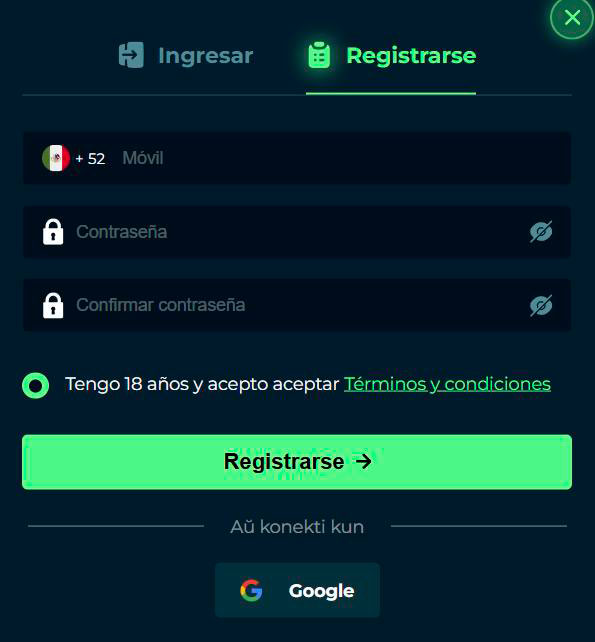
Steps to register with RajaJoy Mexico:
- Open the «Register» section from the header or the login box.
- Enter your mobile number with the prefix +52 in the «Mobile» field.
- Choose a strong password and enter it in the «Password» field.
- Confirm that the same password appears in the «Confirm password» field.
- Check the box to confirm your age and accept the Terms and Conditions.
- Click the «Register →» button to create your RajaJoy account.
Once you are done, your phone number will become your primary login ID for the RajaJoy Casino, sportsbook and rewards system.
Age verification and acceptance of terms
We take age of majority and responsible gambling very seriously, so you must confirm that you are at least 18 years old before joining RajaJoy. On the RajaJoy Mexico registration form, there is a box that says «I am 18 years old and agree to the Terms and Conditions» which you must tick to continue.
- By registering you agree to the Raja Joy Casino Terms and Conditions and Privacy Policy.
- We do not permit accounts of persons under the age of 18, in accordance with our responsible gambling policy.
- You may be asked for verification information from RajaJoy Casino at a later date if necessary.
Honestly, RajaJoy Casino's verification aims to make sure that you can enjoy RajaJoy safely and legally, with clear rules that protect both you and us.
Sign up via Google
If you don't feel like typing passwords into your phone, you can link your account with Google directly from the registration screen. Below the form, you will see «Aŭ konekti kun» followed by a Google option.
- Choose the Google button to sign up using your Google account.
- This method is still linked to your RajaJoy profile and wallet.
- Perfect if you want quick access on all devices without having to remember another password.
Now that your Raja Joy Casino account is created, logging in next time will be even faster.
How to log in to RajaJoy
The login page at Raja Joy Casino is designed for your mobile device, so you'll always know exactly which field to use. You'll see a «Sign In | Sign Up» box plus an option to connect with Google if you prefer.
Log in with phone number and password
Your main login combination at Raja Joy Casino is your Mexican phone number and the password you set during registration. The design of the form makes it clear where each piece of information goes, so you don't waste time.
Standard Raja Joy Casino login flow:
- Open the «Login» window from the header or the login pop-up window.
- Enter your mobile number after the prefix [+52] in the «Mobile» field.
- Enter your password in the «Password» field.
- Click on the «Login →» button to access your account.
Once logged in, you will be returned to the lobby, where you can immediately access Deposits, Game Centre or Promotions.
Options «Remember me» and «Forgot password».»
To make things easier, the login form includes a «Remember my password» checkbox and a «Forgot your password?» link. These two options prevent you from being locked out of your account or having to type in your credentials every time.
- Check «Remember my password» if you are on a private device to stay logged in.
- Use the «Forgot your password?» link if you need to reset your password.
- We recommend not using «Remember Me» on shared devices for security reasons.
If you ever notice that something is wrong with your login, you can always contact Customer Service from the Contact section.
Sign in with Google on your mobile
On mobile, logging in with Google is especially convenient because you are usually already connected to Google on your phone. RajaJoy allows you to tap Google from the login window in «Aŭ konekti kun».
- Tap the Google icon to authenticate with your Google credentials.
- This works very well both in the browser and in the RajaJoy mobile application.
- You still have full access to all your MXN balances, bonuses and betting history.
A big advantage is that logging in with Google reduces the need for typing, which is an advantage when you log in with one hand from your couch.
Managing your RajaJoy account
Once you're in, your Personal Centre is where you manage your money, bets and rewards in one place. The menu includes My Account, Deposit, Withdrawal, Bet History, Account History, Win/Loss, Rewards Centre, Invite Friends, Mission and Internal Message.
Personal Account Dashboard: Deposits, Withdrawals, Betting History
Your account dashboard is basically your control room at RajaJoy. It keeps you up to date with your balance and recent activity, so you always know where your MXN is going.
Key sections in the Personal Centre
- Deposit: add funds to your central wallet using supported methods.
- Withdrawal: link a bank account, set an amount and send withdrawals, with a withdrawal time of 24 hours indicated.
- Betting history: review your previous casino and sports bets.
- Account history and profit and loss: tracks transactions and overall performance.
If you review this regularly, you will always have a clear picture of your game and will be able to adjust your strategy or limits when necessary.
Reward centre, bonus code and mission centre
Another prominent part of your account is the rewards area, where RajaJoy collects your bonuses and tasks. In the menu, you will see the entries Rewards Centre, Bonus Code and Missions, all of which are related to your promotions.
- Rewards Centre: claim and view bonuses, including rewards for logging in and downloading the app.
- Bonus code: enter special codes you receive from promotions or social networks.
- Missions: follow ongoing tasks such as slot play volume challenges and milestones.
Honestly, this is where a lot of additional value is hidden, so visiting the Reward Centre and Missions after logging in is always a good idea.
Safety and responsible gambling at RajaJoy
We want you to feel safe every time you click «Log In», so RajaJoy combines basic security with a strong responsible gaming policy. Logins are linked to your personal mobile number and password, plus you can use a transaction password in the Withdrawals section for added protection.
When it comes to responsible gambling, RajaJoy offers detailed guidelines for setting limits, playing for fun and avoiding trying to recoup losses. You can even request a 6-month self-exclusion if you need a serious break, during which time we will keep your account closed and do our best to block new registrations.
- Tips include setting a maximum amount of losses, time limits and taking regular breaks.
- We make it clear that no children under 18 are allowed to play and we promote parental controls for shared devices.
- Customer service agents are trained to assist with questions about problem gambling.
In short, you manage your credentials and we give you the tools to make your game safe, balanced and fun.

Conclusion
Logging into RajaJoy Casino is all about what really matters to you: quick access with your phone or Google, a simple account control panel and robust tools for managing your money and playing responsibly. Once you're in, everything from deposits to missions to bonuses is just a couple of clicks away, so you can spend less time dealing with forms and more time enjoying the games.

Frequently asked questions
Open the «Register» section, enter your mobile number +52, set and confirm a password, tick the age and Terms checkbox, and then press «Register».
Yes, both the Raja Joy Casino Registration and Login windows display a «Sign in with Google» option so you can log in using your Google account instead of typing in a password.
You can view them in the Personal Centre in the Deposit, Withdrawal, Betting History, Account History and Profit & Loss sections.
Your login is linked to your mobile number and password, withdrawals require a transaction password, and customer service and responsible gaming tools help keep your account secure.
RajaJoy offers detailed counselling, a problem gambling questionnaire, protections for under 18s, parental control suggestions and a 6-month self-exclusion option on request.